> For the complete documentation index, see [llms.txt](https://docs.sxbot.io/llms.txt). Markdown versions of documentation pages are available by appending `.md` to page URLs; this page is available as [Markdown](https://docs.sxbot.io/the-basics/command-permissions.md).
# Command Permissions
Sx Bot is using Discord's v2 command permission system, effective **February 28, 2023.** For more information on this, visit [Discord's command permissions](https://support.discord.com/hc/en-us/articles/4644915651095-Command-Permissions) page.
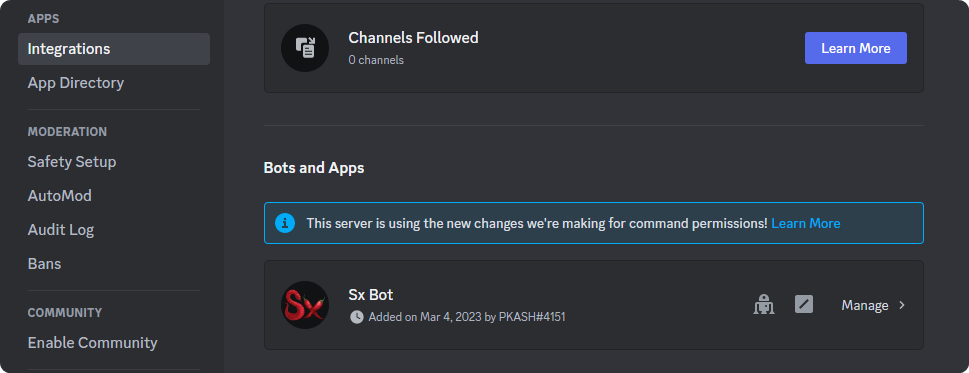
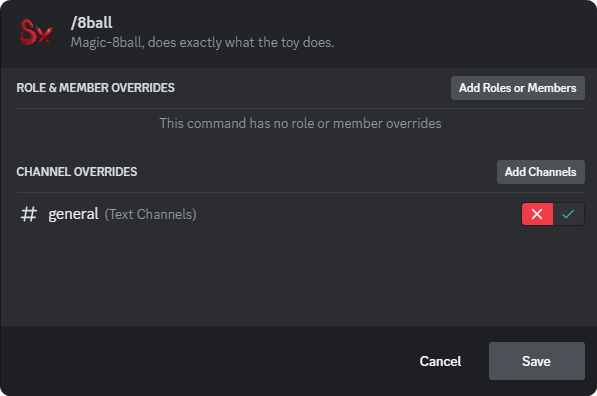
To setup command permissions, head over to **Server Settings -> Integrations -> Bots and Apps -> Sx Bot.** From here you can search for individual commands, and allow or restrict usage based on roles, members, or channels.
Integrations -> Bots and Apps > Sx Bot
Allow or Restrict access to commands by roles, members, or channels.